Golf GPS and stats for iPhone and Apple Watch

Every yardage. Every stat. Free.

Know the number before every shot, and see where your strokes go. Nothing to pay for and nothing to unlock.

Coming soon to the App StoreEmail me when it’s out
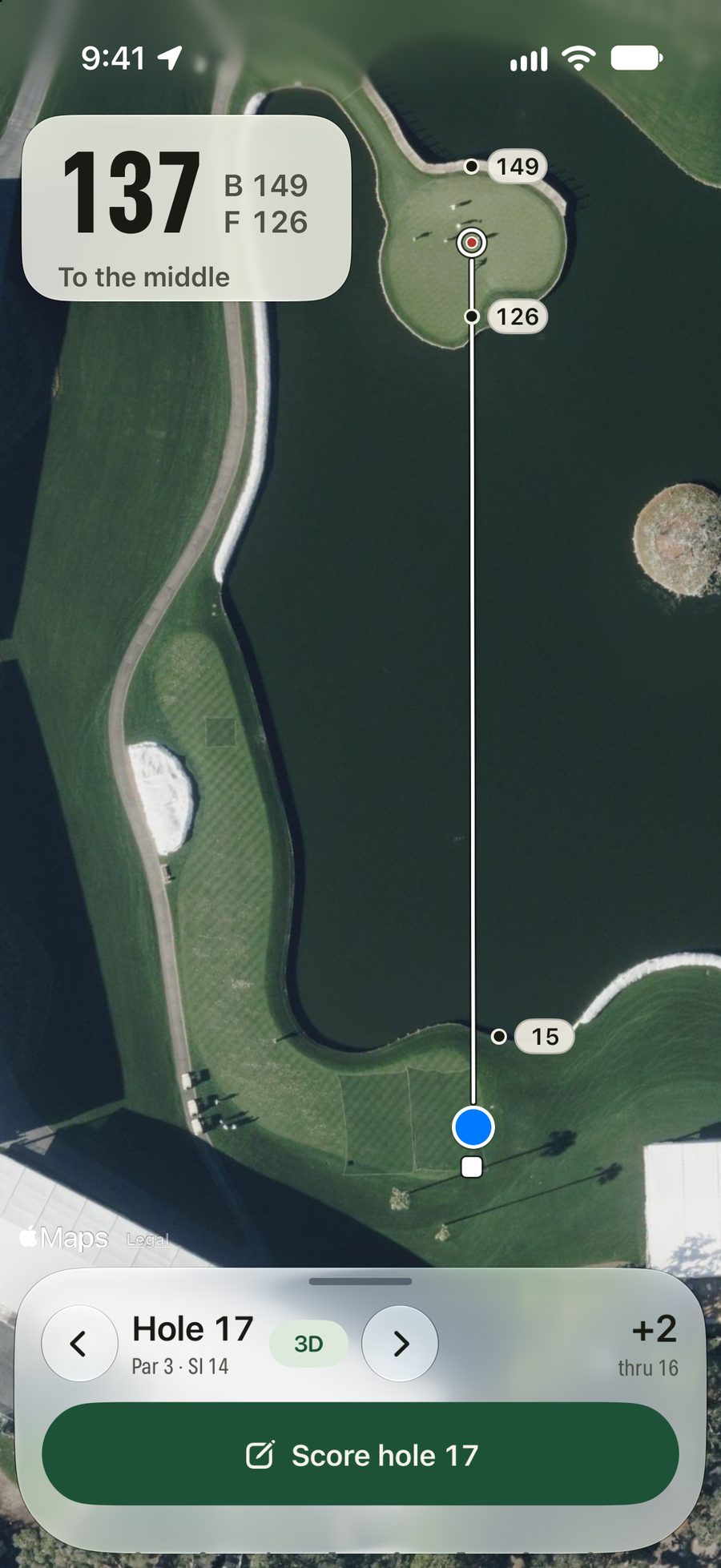
Yardstick on the 17th at TPC Sawgrass Stadium, the island-green par 3: 137 yards to the middle of the green, 126 to the front and 149 to the back, with the water 15 yards ahead labelled on the satellite photo.
Before you play

Is your course here?

13,977 courses across all 50 states, DC, Puerto Rico and Canada. When you’re at one, the app opens on it.

Start typing and the list fills in as you go.

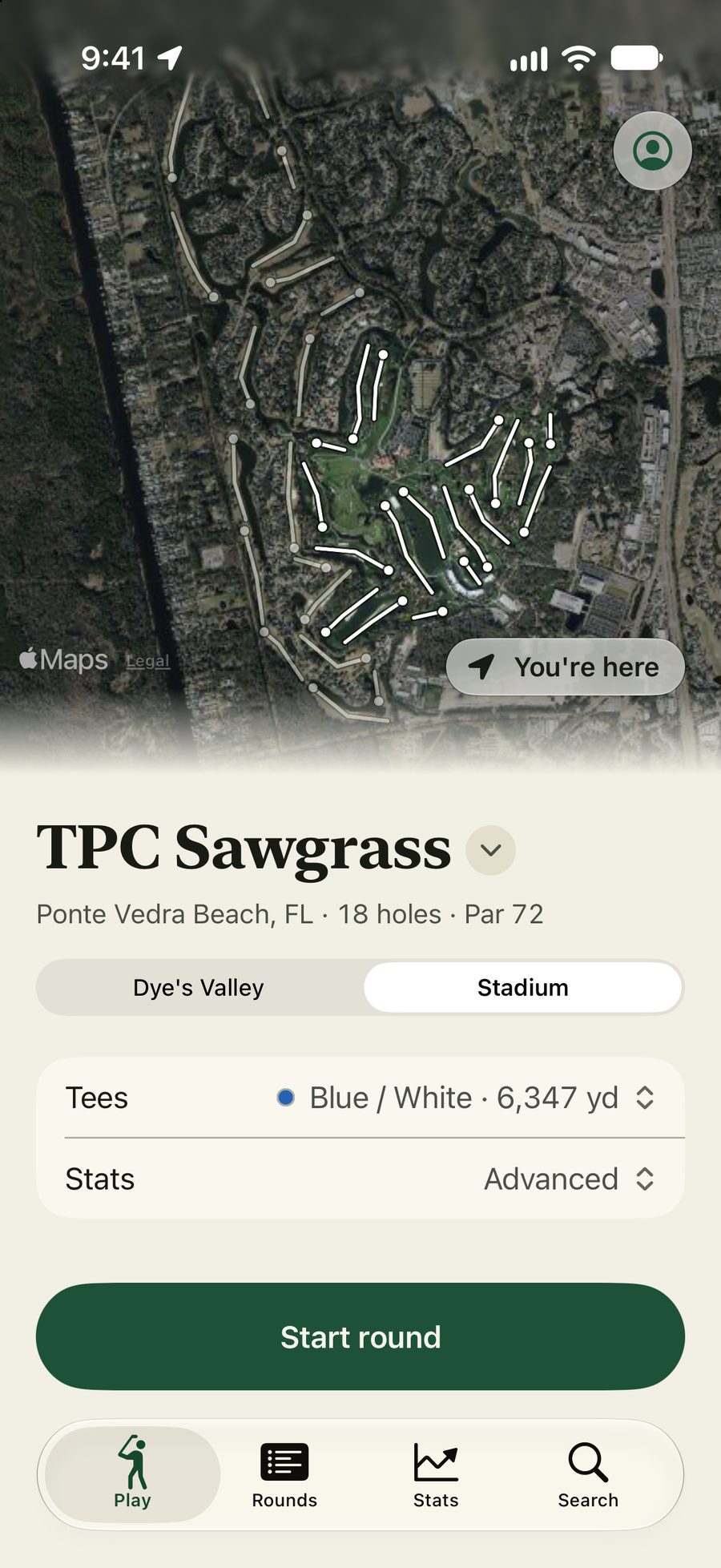
    The Play tab at TPC Sawgrass in Ponte Vedra Beach, Florida: the Stadium course from above with its routing, the Blue / White tees chosen, and one button to start the round.
    Open the app and the course you’re at is already there.
    Every yardage

    Know the number before you pull a club.

    Front, middle and back, the carry over the water, and any spot you pick, live from where you stand. On your phone and your wrist.

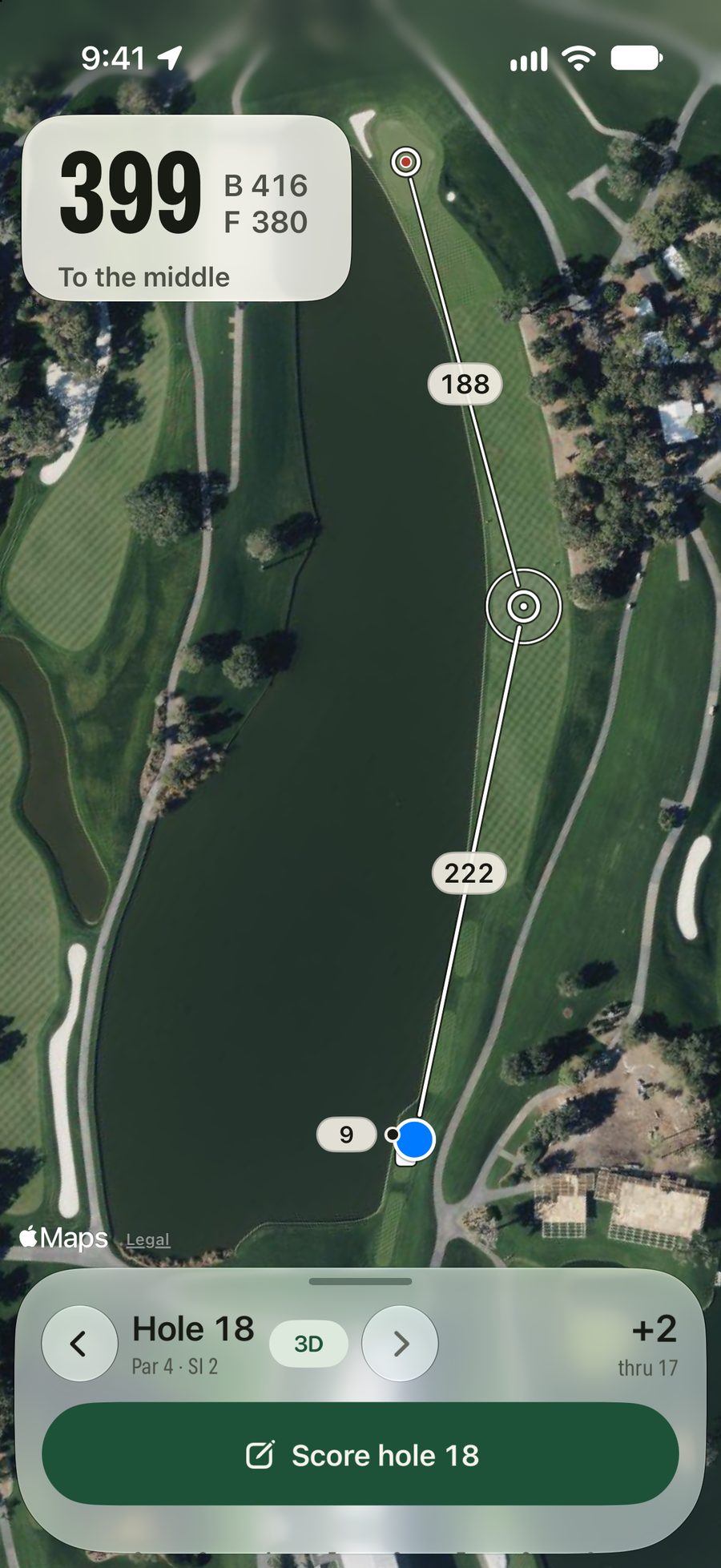
    A target dropped in the 18th fairway at TPC Sawgrass: 222 yards to it and 188 left to the green, with the miss circle around it and the water down the left.
    Touch anywhere: how far it is, and what’s left to the green.
    Fly the hole: see it tee to green in 3D before you play it.
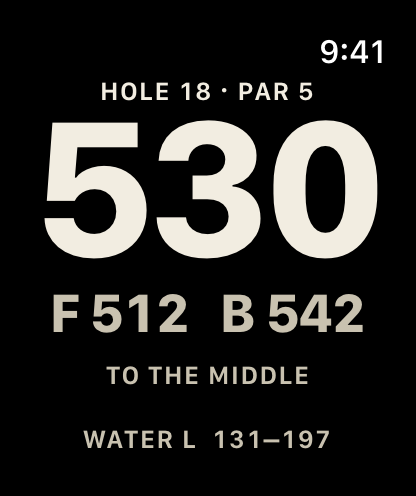
    Yardstick on Apple Watch on a par-5 18th: 530 yards to the middle, 512 to the front and 542 to the back, with water on the left from 131 to 197.
    On your wrist, from the watch’s own GPS.
    • Front, middle and back

      Live from where you stand, on a satellite photo of the hole.

    • Water and bunkers

      What it takes to reach the water or a bunker on your next shot, and what it takes to carry it.

    • Touch to measure

      Drag a target anywhere to see how far it is and what’s left, with a circle for your usual miss.

    • On your Apple Watch

      Raise your wrist for front, middle and back and the hazards ahead. The phone stays in your pocket.

    Every stat

    See where your strokes go.

    Keep just the score, or track as much as you like. The stats other golf apps put behind a subscription are all here, free.

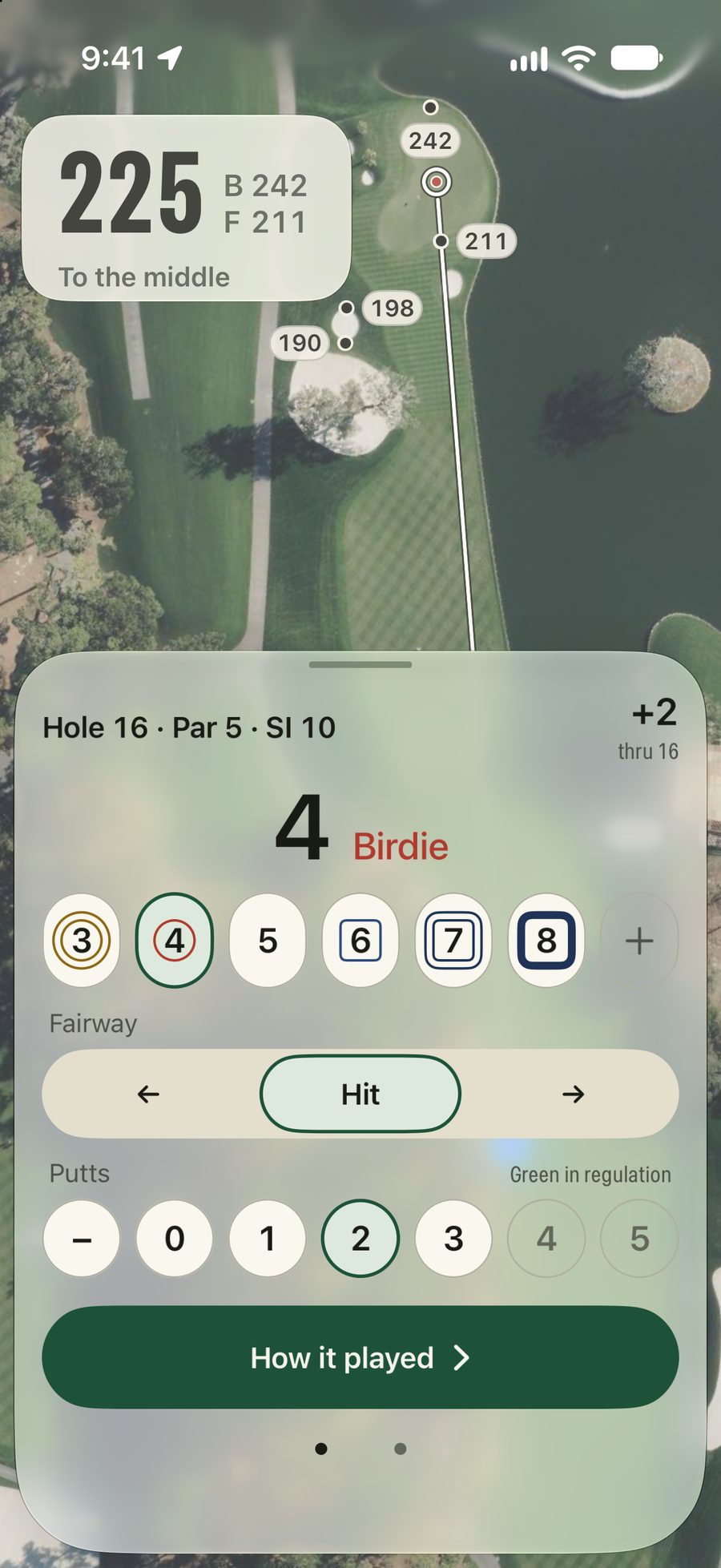
    Scoring the par-5 16th at TPC Sawgrass: a birdie 4, fairway hit and 2 putts, with 225 yards to the middle of the green above, and +2 through 16.
    Tap the score, then the putts.
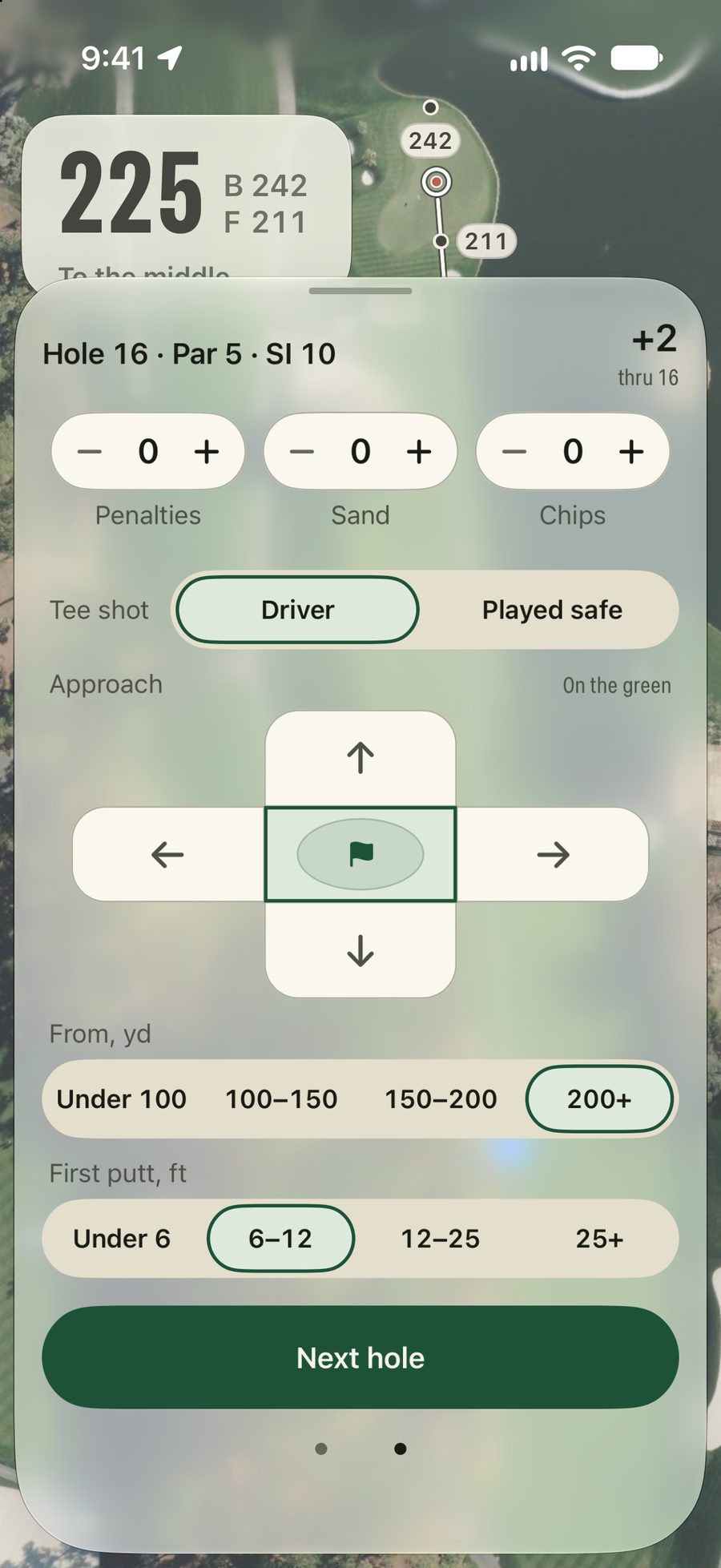
    The second page of scoring on the 16th: no penalties, sand shots or chips, driver off the tee, the approach on the green from 200+ yards, and a first putt of 6–12 feet.
    Advanced, if you want it.
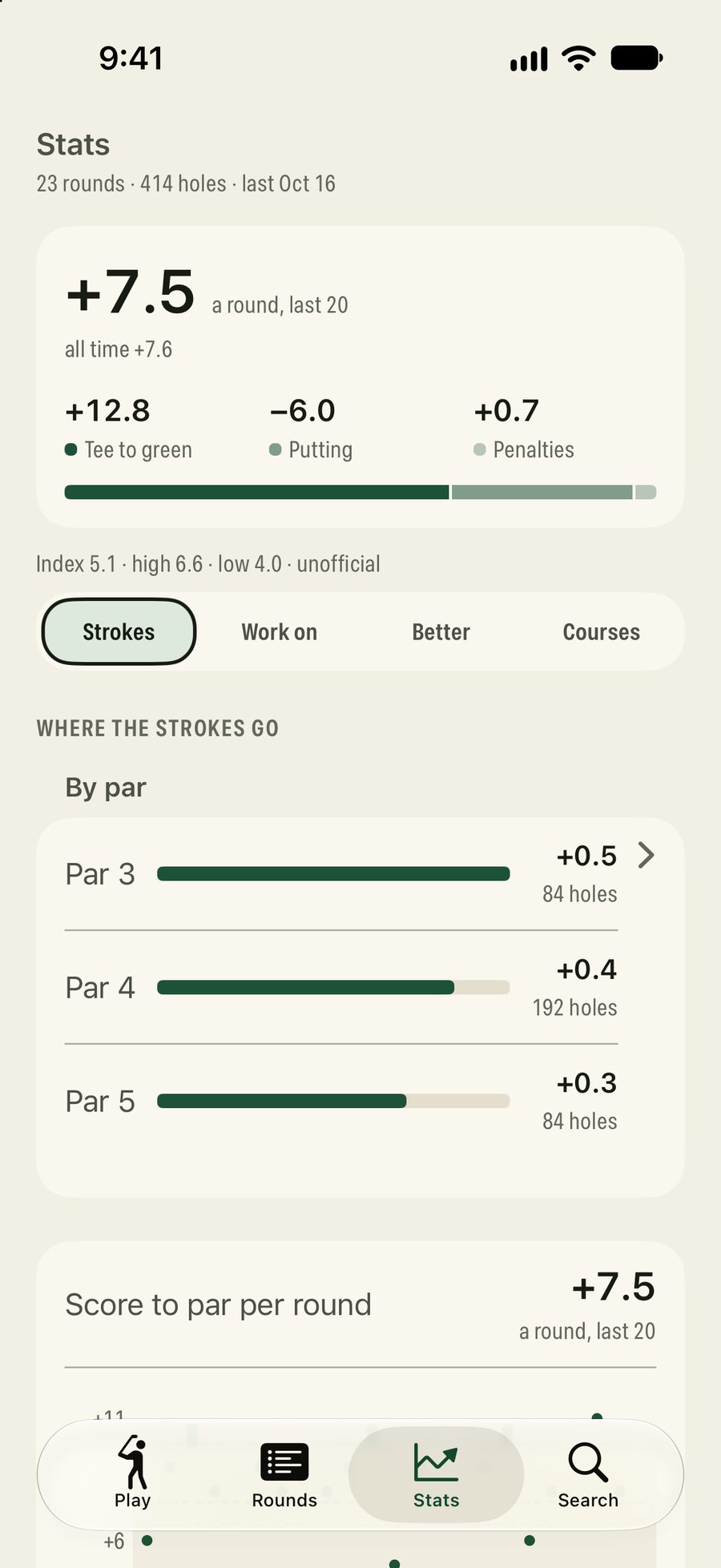
    The Stats tab after 23 rounds: +7.5 a round over the last 20, split into tee to green, putting and penalties, an index of 5.1, and strokes over par on par 3s, 4s and 5s.
    Where your strokes go.
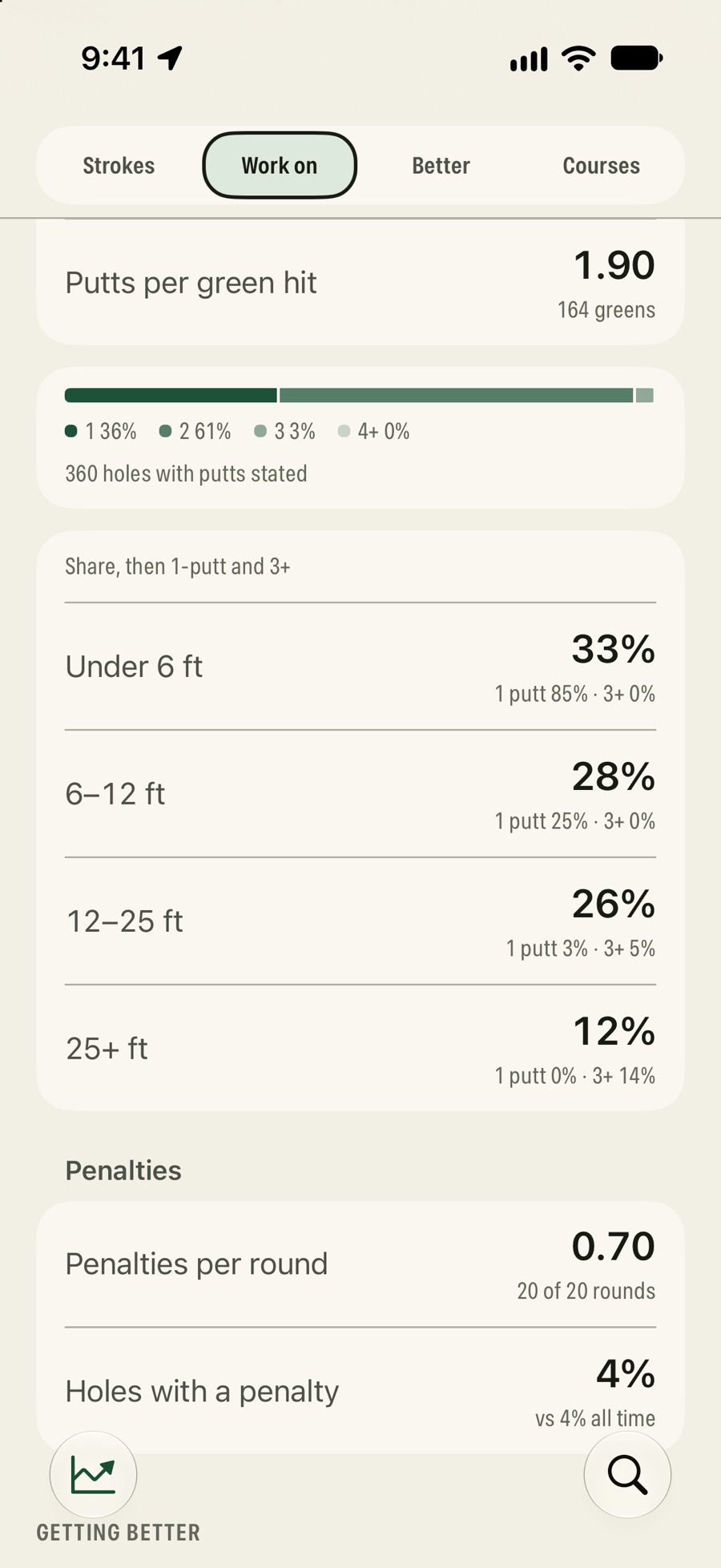
    Advanced putting stats: 1.90 putts per green hit, 1, 2 and 3-putts as a share of holes, and for first putts from under 6, 6–12, 12–25 and 25+ feet how often each is one-putted, then 0.70 penalties a round.
    Advanced stats, down to the first putt.
    • Score in two taps

      Score a routine hole in two taps, with fairways, greens and putts. Fix any round, any time.

    • Advanced, if you want it

      Tee club, where the approach missed and from how far, first-putt distance, scrambling, sand saves, chips and penalties.

    • Where your strokes go

      Tee to green, putting and penalties, so you know which part of your game is costing you.

    • Advanced stats

      Greens hit from each distance, scrambling, sand saves, putting and your misses off the tee, each next to your own average.

    Less phone, more golf

    The yardage, without the fumbling.

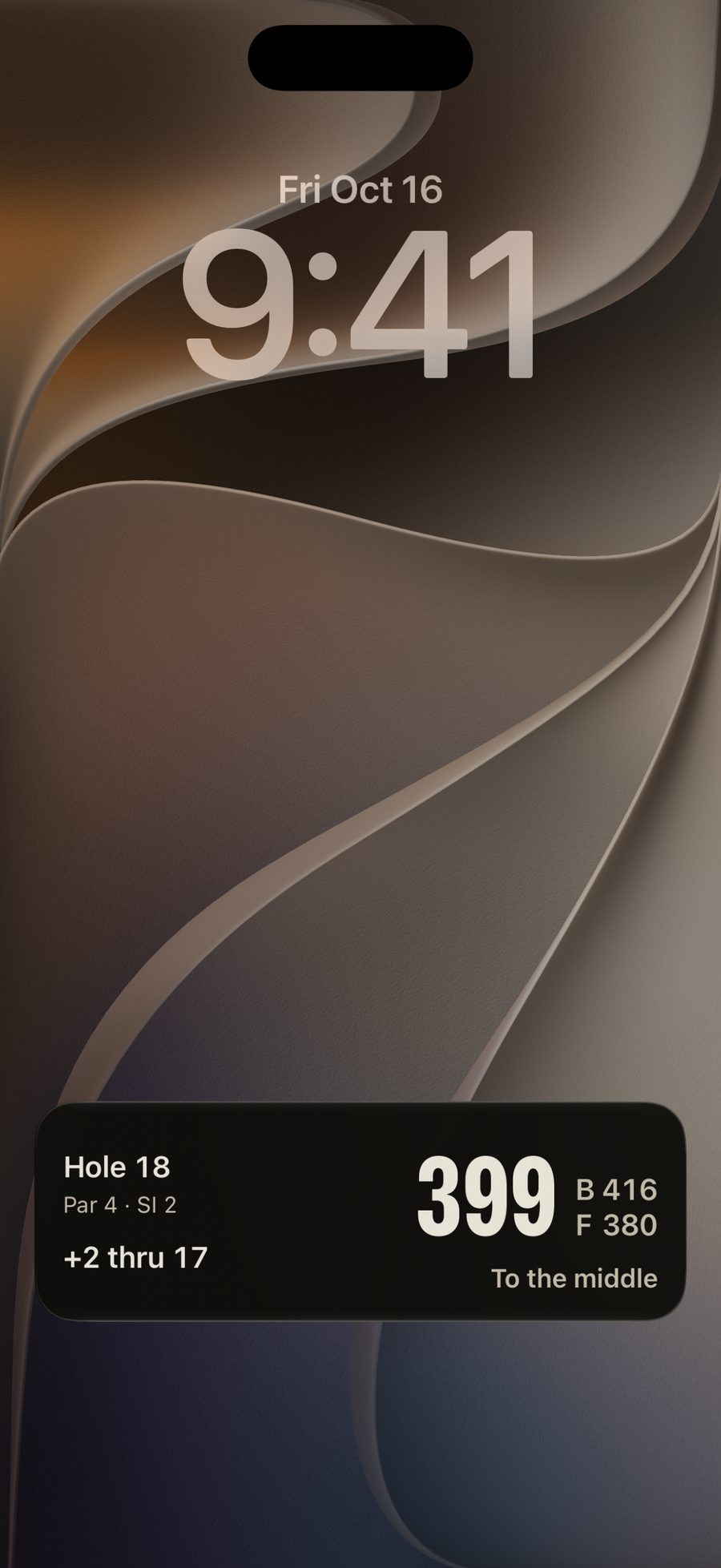
    The Lock Screen during a round: hole 18, par 4, 2 over through 17, and 399 yards to the middle, 416 back, 380 front.
    The hole and its yardage on your Lock Screen, all round.
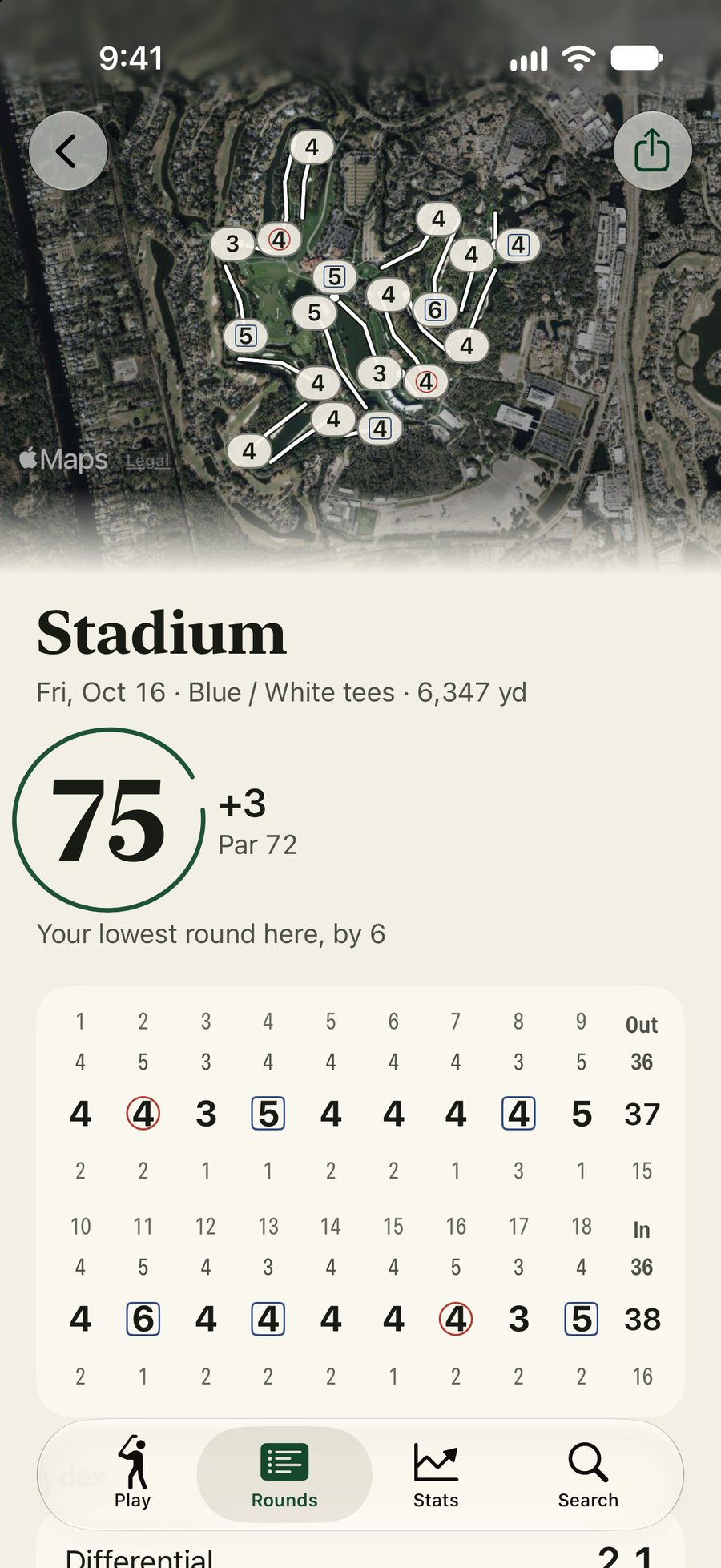
    The finish at TPC Sawgrass: every hole's score on its green from above, then a 75, 3 over par, the golfer's lowest round there by 6, with the full scorecard: two birdies and no doubles.
    Every score on the course when you finish.
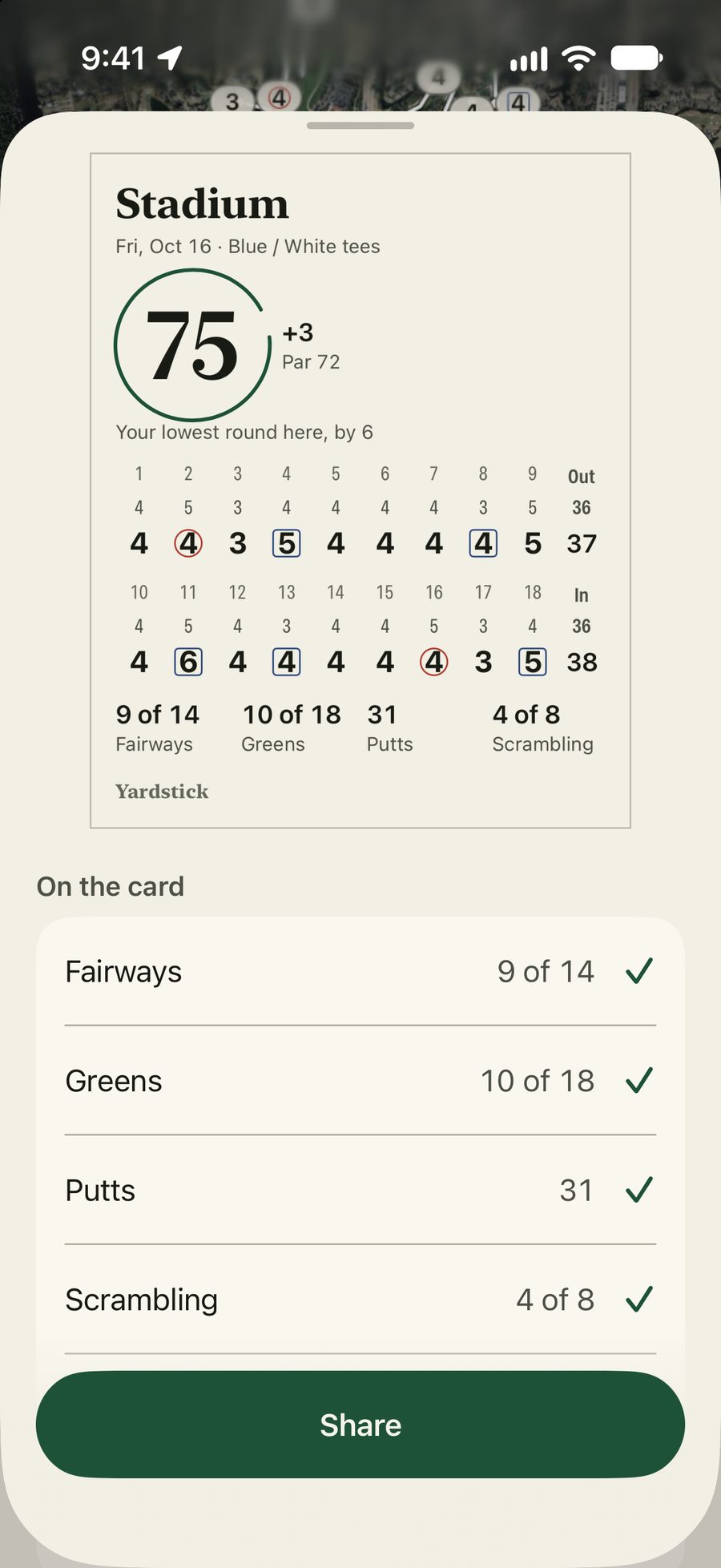
    The share sheet: the scorecard for a 75, 3 over par, on the Stadium course, with two birdies, fairways 9 of 14, greens 10 of 18, 31 putts and scrambling 4 of 8 on the card.
    Send the card to your group.

    Ask Siri

    With AirPods in and the phone locked, Yardstick answers out loud.

    “Yardstick yardage.”
    Hole 7: 142 to the middle, 131 front, 155 back.

    One press to play

    On an iPhone with an Action button, set it to Play golf and one press opens your round.

    In the Dynamic Island

    Leave the app for your music or a text, and the hole and its yardage stay at the top of the screen.

    Side by side

    What you get without paying.

    Yardstick against the free versions of five of the best-known golf apps, from each company’s own comparison of its free and paid plans. Their paid plans run $59.99 to $99.99 a year.

    What’s freeYardstick18BirdiesSwingUGolfshotHole19TheGrint
    Advanced stats✓limited✗limited✗limited
    No account needed✓✗✗✗✗✗
    No ads✓✓✗✗✗✗
    Apple Watch: green and hazards✓green only✓center onlygreen onlygreen only
    Water and bunker carries✓✓✓✗Premium✓
    Front, middle and back of the green✓✓✓center only✓✓
    Scorecard and basic stats✓✓score and putts✓scorecard only✓
    Yearly price of the paid plan$0$99.99/yr$59.99/yr$79.99/yr$99.99/yr$59.99/yr

    Basic stats are fairways, greens and putts. Advanced stats are tee and approach misses, scrambling, sand saves, chips, by par, per course and what to work on. A free version that has only some of them reads “limited”.

    Sources for every cell

    Competitor free tiers as published by each company, checked 16 October 2026: 18Birdies, SwingU, Golfshot, Hole19, TheGrint, and each app’s help center and App Store page. Prices are each company’s yearly US price for the paid plan that unlocks these features. If something here is out of date, tell us at hello@yardstick.golf and we’ll fix it.

    Advanced stats

    • Yardstick: Tee club, tee and approach misses, approach distance, first-putt distance, scrambling, sand saves, chips, penalties; by par, per course, what to work on.
    • 18Birdies: 18Birdies: basic round stats free; “Advanced Stats: … charts, filters, and comparisons” Premium (App Store; help 661).
    • SwingU: SwingU plan table: “Enhanced Scorecard & Stats” Plus/Pro; “#1 improvement priority” Pro (swingu.com; App Store).
    • Golfshot: Golfshot Free vs Pro: core stats free; “Detailed round review stats” Pro.
    • Hole19: Hole19 help: Performance Trends (scrambling, sand saves, scores by par) “is available on the Intelligence plan” (help 27329466583068).
    • TheGrint: TheGrint: “Free members see the headline numbers in each stats module. Pro unlocks the full detail” (thegrint.com/features/stats).

    No account needed

    • Yardstick: No account or sign-in.
    • 18Birdies: 18Birdies help: “Do I need an account to use 18Birdies? Yes.” (help.18birdies.com/article/15).
    • SwingU: SwingU help: “Why do I need to create an account to use SwingU?” (help.swingbyswing.com/article/55).
    • Golfshot: Golfshot terms: “To use the Service, you must register for an account” (golfshot.com/terms-of-service).
    • Hole19: Hole19 help, How to create an account: open the app, sign up, then continue with the free version (help 11409509921820).
    • TheGrint: TheGrint privacy policy: registering you as a user “is necessary”; the free tier is a “Free account” (thegrint.com/about_us/privacy_policy).

    No ads

    • Yardstick: No ad SDK in the app.
    • 18Birdies: 18Birdies' US App Store listing carries no Advertising flag (its feed shows 18Birdies' own promotions, help 564).
    • SwingU: SwingU App Store: “Contains Advertising”; “No Ads In-App” is a Plus/Pro feature (swingu.com).
    • Golfshot: Golfshot App Store: “Contains Advertising”; Pro unlocks an “ad-free experience”.
    • Hole19: Hole19 help: “Ad-free mode is only available with Premium or Intelligence” (help 360015546153).
    • TheGrint: TheGrint App Store listing: “Contains: Advertising” (apps.apple.com/us/app/id532085262).

    Apple Watch: green and hazards

    • Yardstick: Front, middle, back and the hazards ahead on the wrist, from the watch's own GPS. Apple Watch Series 6 or SE (2nd generation) or later; the round starts on the iPhone.
    • 18Birdies: 18Birdies help: the watch shows “front, middle, and back distances”; Map View “Premium membership required” (help.18birdies.com/article/273, /732).
    • SwingU: SwingU: free tier gives “Full GPS distances and scoring on your wrist”; its App Store watch screenshots show a Hazards screen (swingu.com/blog/what-is-swingu).
    • Golfshot: Golfshot help: the free watch shows “GPS distances to the center of the green” (shotzoom.zendesk.com/hc/en-us/articles/360000942773).
    • Hole19: Hole19 help: free watch GPS distances; “Distance to Hazards is currently not available on the Apple Watch” (help.hole19golf.com/hc/en-us/articles/16533598017180, /360016205019).
    • TheGrint: TheGrint: “GPS distances on the watch are free”; the GPS Aerial Map is Pro (thegrint.com/features/apple-watch).

    Water and bunker carries

    • Yardstick: The nearest water and bunkers on the next shot, wherever the green is mapped.
    • 18Birdies: 18Birdies App Store free features: “Distances to greens, hazards, layups, carries” (apps.apple.com/us/app/id892700751).
    • SwingU: SwingU plan table: “Distances to Greens & Hazards” included in Basic (free) (swingu.com).
    • Golfshot: Golfshot App Store: “Pro Membership unlocks: … hazard and target distances” (apps.apple.com/us/app/id622851626).
    • Hole19: Hole19 help: Distance to Hazards “allows Premium members to see the distance … to nearby bunkers and water hazards” (help.hole19golf.com/hc/en-us/articles/23243760853788). Its App Store free list says “every hazard”; the two disagree.
    • TheGrint: TheGrint: free GPS lets you “know your distances to the pin, hazards, and landing zones” (thegrint.com).

    Front, middle and back of the green

    • Yardstick: Wherever the green is mapped: about 9 in 10 US courses. Canadian courses show the middle for now; a dash marks an unmapped green.
    • 18Birdies: 18Birdies help, What's included with Premium: free “GPS distances to the front, center, and back of the green” (help.18birdies.com/article/661).
    • SwingU: SwingU, What is SwingU?: free “distances to the front, middle, and back of every green” (swingu.com/blog/what-is-swingu).
    • Golfshot: Golfshot Free vs Pro: Free has “Distances to the center of green”; front/center/back is Pro (golfshot.com/golfshot-free-vs-pro).
    • Hole19: Hole19 App Store free features: “front, center, and back of the green” (apps.apple.com/us/app/id794462227).
    • TheGrint: TheGrint GPS: front, center and back distances free (thegrint.com/features/gps).

    Scorecard and basic stats

    • Yardstick: Score, fairways, greens and putts, and the stats from them.
    • 18Birdies: 18Birdies: Scoring and Stats Tracking free; “Basic Course & Round Stats” (18birdies.com/premium; help 661).
    • SwingU: SwingU App Store: the free scorecard “tracks score and putts”; Plus adds “driver accuracy, bunker play, penalties”.
    • Golfshot: Golfshot Free vs Pro: Free “Statistics for Fairway, GIR, Recovery, Putting, Pars, Scoring and Club”.
    • Hole19: Hole19: free scorecard records putts, fairways and GIR; “Club & Overall Stats” are Premium (App Store; help 26051600319516).
    • TheGrint: TheGrint Membership table, Free: “Scoring & Basic Stats: Unlimited” (thegrint.com).
    Why it’s free

    What’s the catch? There isn’t one.

    1. 1

      We map the courses ourselves

      Course data is one of the biggest costs of running a golf app. Our own system maps every course, so there’s no data bill to pass on to you.

    2. 2

      There are no servers to pay for

      Your yardages, scores and stats are worked out on your iPhone, so there are no servers for us to pay for.

    3. =

      So there’s nothing to sell you

      No subscription, no trial, no ads, nothing to unlock. Every yardage and every stat, on your phone and your wrist.

    Who makes it

    I’m Aydin. I play most of my golf with the same few friends, and every app we tried kept the good parts behind a subscription: the stats that show where your strokes go, the hazards on your watch, a round without ads.

    So I built a system that maps golf courses, ran it across the US and Canada, and built the app my friends wanted on top of it. Every yardage, every stat, free.

    Aydin, founder of Yardstick
    Yours

    Your rounds stay on your iPhone.

    No account and no tracking. Your rounds and your location never leave your phone.

    Read the privacy policy, in plain words

    Data Not Collected

    The developer does not collect any data from this app.

    Yardstick’s privacy label on the App Store, written by Apple’s rules.

    Take it to your next round.

    Coming soon to the App Store, free. For iPhone, and Apple Watch if you wear one.